All channels in one inbox
Every WhatsApp, Instagram and Messenger chat lands in the same inbox, with the channel shown on each conversation.

Platform
WhatsApp, Instagram and Messenger in one shared inbox. Hand each chat to the right agent, follow every reply in the same thread and keep the admin tools for yourself.
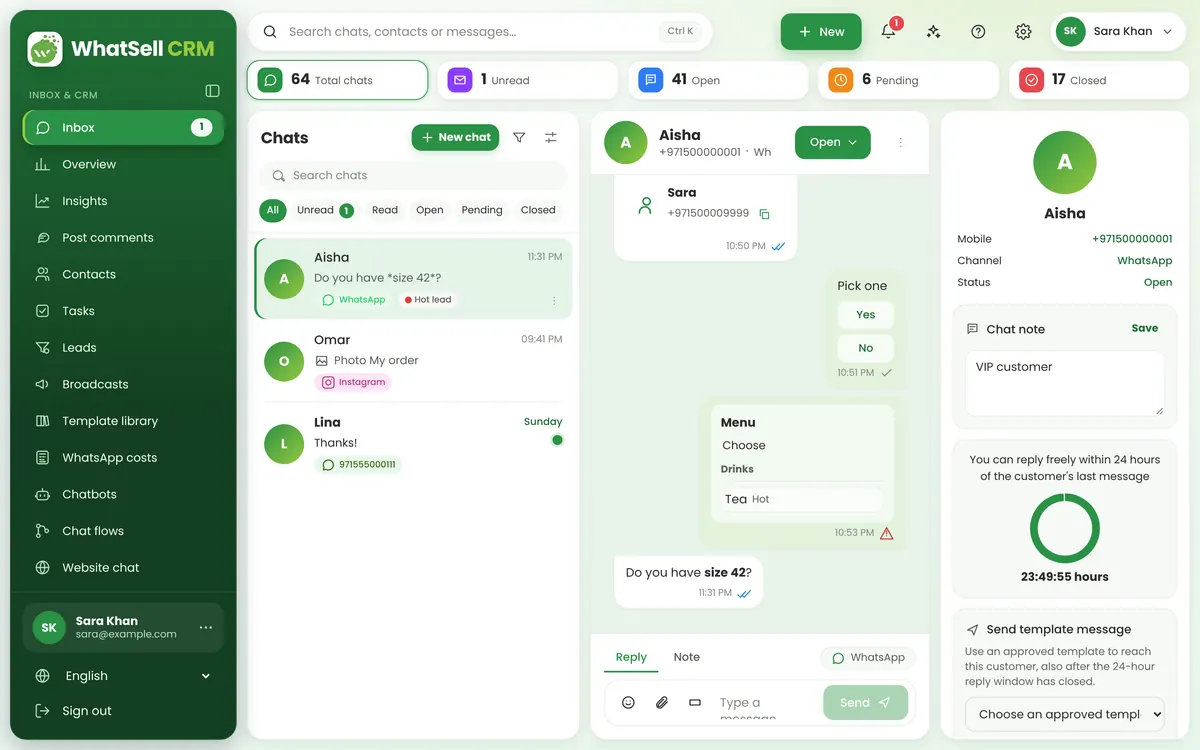
Every WhatsApp, Instagram and Messenger chat lands in the same inbox, with the channel shown on each conversation.
Give a chat to an agent, or pass it on to a colleague when someone else should take over.
Agents sign in with their own account and work on the chats and tasks given to them.
Invite co-admins and decide who may use Marketing, Partners and the Group dashboard.
Pause an agent's access at any time, or edit their details.
Each conversation shows a tag with the name of the agent handling it.
See one agent's chats at a time, or sort the inbox by who is handling what.
As the owner you see each agent's replies in the customer's thread, with the agent's name on the message.
Agents get their chats, their tasks, their customers' details and their follow-ups, with follow-up automation that uses ready-to-use approved templates.
Settings, billing, channel connections and onboarding stay with the owner and co-admins.
Agents and owners work the same way in the web portal and in the WhatSell mobile app.
Start free, or see it working in a live demo with our team.